Showing posts with label update. Show all posts

Wednesday, October 12, 2016

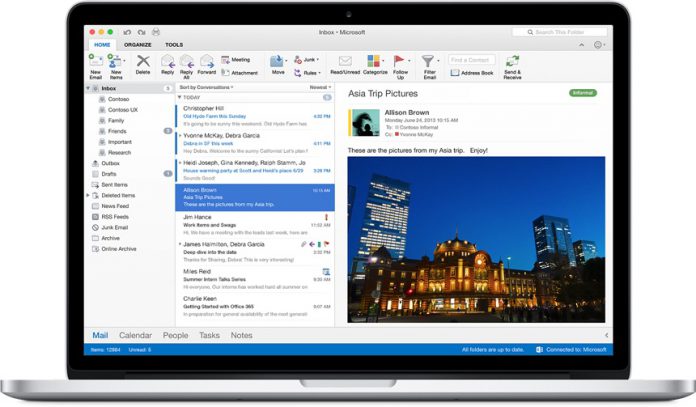
Microsoft Releases Office 2016 Build 15.27 to Production on Mac


A week after launching Office 2016 15.27 to the Insider Slow Ring, Microsoft has

 introduced the update to the production release ring.

Microsoft is continuing to bolster its Office suite on Apple platforms. A week after rolling out an update for Office 2016 on the Insider Program, the updates arrive on the production ring. This means the updates were saw last time have rolled out to all users.
This brings the Office 2016 suite up to version 15.27 (161003) on Mac.
The changelog is the same as the Insider release a week ago. However, there is one new addition to the feature set for the production ring release. More specifically, OneNote now sports a new spell checker tool to help users tidy up typos.
  • More functions: In Excel, use CONCAT or TEXTJOIN to shorten your text formulas, or try the forecasting functions to help you see the future. (Feature requires an Office 365 subscription.)
  • Trim audio and video files: In PowerPoint, trim unwanted content from the beginning or the end of your audio or video files. You can also trigger an animation by using a bookmark in your media file. (Feature requires an Office 365 subscription.)
  • Make sure your notes are accessible: In OneNote, find and fix accessibility issues in your notes using the Accessibility Checker on the Tools menu.
  • Try our new designs: In OneNote, we’ve made some changes to help you get around your notes. Check them out by turning on Preferences > General > Enable experimental features, and let us know what you think!
  • In OneNote correct your typos by using suggestions from the spell checker.
As well as moving version 15.27 (161003) to production, Microsoft also sent out a new update to the Slow ring. This is another 15.27 build, namely 161007. There is no changelog for this release so it is probably to clear up issues and fix bugs in 15.27 161003. Expect this release to make its way to production in the next

Wednesday, October 5, 2016

Windows 10 Anniversary Update: Fix for endless reboot problem coming soon, says Microsoft


Microsoft promises it is close to resolving an issue with an update that refuses to install on some PCs.

By Nick Heath | October 4, 2016, 4:28 AM PST
Microsoft marked the first birthday of Windows 10 by giving the OS a major upgrade.
Image: Nick Heath / TechRepublic

Microsoft is in the final stages of fixing a Windows 10 update that endlessly rebooted some PCs.

Issued last Friday, the patch, known as Cumulative Update 14393.222, would keep restarting some Windows 10 computers in a vain attempt to install itself.

Microsoft has acknowledged the problem affecting the patch for the Windows 10 Anniversary Update and said it is on the verge of correcting it.


What's Hot at TechRepublic
Dark Web: The smart person's guide
8 reasons why professionals should get the iPhone 7
Quantum leap: D-Wave's next quantum computing chip offers a 1,000x speed-up
Gallery: 10 pieces of obsolete technology still in use today

"We've been working diligently on this issue and are finalizing a clean-up script that will fix the underlying issue preventing the install of KB3194496 (Cumulative Update 14393.222) for affected users," said a Microsoft employee on the firm's official forums.

"Your patience during our research and subsequent work is greatly appreciated."

Microsoft has been criticised for releasing this latest update to the general public after the installation problem was spotted by people testing early builds of the OS under the

Monday, October 3, 2016

How to deploy a Ceph storage cluster


By Jack Wallen | October 2, 2016, 4:51 PM PST


Deploying a storage cluster doesn't have to wreck your sanity. See how simple it can be to deploy an object or block storage-capable Ceph cluster.


If you're looking to deploy a local Amazon Simple Storage Solution (Amazon S3) or Elastic Block Store (EBS) system, you probably believe it's almost impossible to pull off—it's not. Actually, it can be done with the help of Ceph.

A Ceph cluster can provide object or block storage across a network, which will give you that Amazon-like system. To make this happen we'll use a Ubuntu 16.04 virtual machine and three clones. Our cluster will be comprised of two storage nodes and one monitoring node. The first virtual machine will be used to initially deploy the cluster. This setup

Sunday, October 2, 2016

How to update to iOS 10 using Apple Configurator 2


Apple Inc.


Updating to iOS 10 is pretty simple for end users, though it's not a breeze for IT teams, which might have to update hundreds of devices. Apple Configurator 2 can help.


By Jesus Vigo | September 30, 2016, 10:58 AM PST


Apple Configurator 2, the Apple-provided application that allows for mass configuration of iOS-based devices, offers the right blend of user experience and powerful management features to simplify the deployment process for any SMB or enterprise environment. I'll show you how to configure iOS devices for iOS 10 with Apple Configurator 2.


SEE: Screenshots: A complete roundup of new iOS 10 features

Requirements

Apple computer running OS X 10.11.5 or

newer


What's Hot at TechRepublic

How to set up Windows 10 on the Raspberry Pi

Myth busted: Older workers are just as tech-savvy as younger ones, says new survey

How Tesla Autopilot drove a man with a blood clot to the hospital, and expanded the autonomous car debate

Photos from Star Trek 50 in Las Vegas: see Shatner, Takei, a wedding, and cosplay

Apple Configurator 2

At least one iOS-based device

At least one USB charging cable for your iOS device

Powered USB hub (only required if updating multiple iOS devices at the same time)

Administrative credentials

Update to iOS 10 using Apple Configurator 2


1. Launch the Apple Configurator 2.app and click the Get Started button to access the main screen (Figure A).


Figure A

Image: Jesus Vigo/TechRepublic


2. Power on and connect your iOS device via the USB charging cable to an open USB port or an optional USB hub. The app will detect the model of the iOS device and provide the device name once it's fully connected. If multiple devices are connected at once, they will be displayed onscreen, and a badge will appear with the number of devices ready for configuration (Figure B).


Figure B

Image: Jesus Vigo/TechRepublic


3. Highlight all the devices you wish to update and click the Update button in the toolbar. This will query Apple's database to locate the latest versions of iOS supported for each device and compare them to the database (Figure C) (Figure D).


Figure C

Image: Jesus Vigo/TechRepublic


Figure D

Image: Jesus Vigo/TechRepublic


4. After clicking the Update button when prompted, click the Accept button to agree to Apple's Licensing Terms (Figure E).


Figure E

Image: Jesus Vigo/TechRepublic


5. Apple Configurator 2 will begin to download the latest versions of iOS and save them to the computer. As the download completes, the update process will begin for the devices connected (Figure F) (Figure G).


Figure F

Image: Jesus Vigo/TechRepublic


Figure G

Image: Jesus Vigo/TechRepublic


6. The download process will depend on your internet speeds from your ISP; however, the upgrade process takes about 20 minutes on average, and multiple devices can be upgraded at the same time from the same IPSW firmware file.


When installation is complete, the device will reboot before reconnecting to Apple Configurator 2 again. This is normal operating procedure, and the screen may change to reflect a disconnect during this brief time (Figure H).


Figure H

Image: Jesus Vigo/TechRepublic


7. When the iOS device has been successfully updated, you will be required to unlock the device once to finalize the process. You may not disconnect your newly updated iOS device (Figure I).


Figure I

Image: Jesus Vigo/TechRepublic


With the basic update process completed, you'll find that Apple Configurator 2 has a lot more to offer when deploying specific configuration sets using Blueprints or preparing devices to be securely managed or supervised either manually or Over-the-Air (OTA) using Mobile Device Management (MDM) servers.


Thursday, September 29, 2016

FCC votes to bolster Wireless Emergency Alerts


By Shawn Knight on September 29, 2016, 6:15 PM


The Federal Communications Commission on Thursday voted to update the rules governing Wireless Emergency Alerts (WEA) in an effort to make them more useful.

The system, designed to alert citizens on their mobile devices of emergency-type situations or events, was most recently on display earlier this month when New Yorkers were warned of a dangerous bombing suspect on the loose.

As The Washington Post recounts, the suspect was eventually apprehended following a shootout with police. The alert that was pushed out to the public wasn’t terribly informative; in fact, the publication likened it to a text message that a teenager might send to a friend. What’s more, the alert lacked helpful information that might have led to his apprehension sooner such as a photo.

Authorities would no doubt have preferred to issue a more detailed alert but simply weren’t able to do so due to limitations of the WEA system. As such, the message that went out was ripe with abbreviations and didn’t include a picture of the suspect.

Thanks to today’s FCC vote, future alerts should be much more robust.

Under the new rules, authorities will have up to 360 characters at their disposal – up from just 90 currently and far less than even Twitter’s 140-character limit. Furthermore, authorities will be able to send alerts with greater geographic accuracy which means you’ll be less likely to receive an alert about a tornado that may be many miles away.

Future messages will also be available in Spanish and will cover additional events, we’re told.

Skype update for iOS adds Siri integration, supports iOS 10 features

#SKYPE

Skype update for iOS adds Siri integration, supports iOS 10 features


By 
Skype has announced an update for iOS users that claims to integrate the best iOS 10 features into the Skype experience.
The latest Skype version 6.25 for iPhone and iPad adds support for Siri integration, which enables users to use Siri to make Skype calls. Now you can simply say “Call James Archer” to start a call on Skype after confirmation on the right contact from Siri, Skype says in a blogpost.
Image Credit: Skype
Image Credit: Skype
In addition to Siri integration using the SiriKit, Skype has also added support for CallKit where incoming Skype calls will look exactly like any regular incoming call. This will enable easier switch between a regular call and a Skype call. The company announced that SiriKit and CallKit integration would arrive at their Skype for Business iOS apps next month providing business owners same freedom as announced in the Skype Blogs.
Image Credit: Skype
Image Credit: Skype
There are some limitations with the implementation of the features as you can only make calls to the people if they are in your Skype contact list. You can’t search and add new contacts to your Skype contacts using Siri commands. This update comes right after the update released fromWhatsApp and OlaCabs for iOS 10.

Moto Z and Moto G4 series to get Android 7.0 Nougat in Q4

Moto Z and Moto G4 series to get Android 7.0 Nougat in Q4
Google’s new Android 7.0 Nougat update has started rolling out to the Nexus as well as some Android One smartphones. Even LG announced that its new smartphone, the V20, will come with the new update out of the box. The next smartphone(s) in line that might get the new update will be coming from Lenovo, err Moto.
According to Droid Life, a Lenovo spokesperson has given a tip that the Nougat update will start rolling for the Moto Z range as well as the Moto G4 series in the fourth quarter of this year. So basically the Moto Z, Moto Z Force, Moto Z Play, Moto G4, Moto G4 Plus and hopefully the Moto G4 Play.
There is no info around other Moto products however Lenovo has said that “upgrades are about getting it right and making sure the phone performance remains the best it can be and that the company will be sharing upgrade plans for other products and more specific timing later.”
Assumingly the Moto X range and the Moto G 3rd-gen will get the new update by early next year. And knowing Motorola, it shouldn’t on time in bringing the new update to its products as it has been one of the only few brands that rolls out updates on time.


Tuesday, September 27, 2016

Unlike PlayStation 4 Pro, the Xbox Scorpio will natively support 4K: Microsoft exec


Microsoft has confirmed that at least some of the games developed for the Xbox Scorpio will natively support 4K resolutions.
Referring to games developed by Microsoft for the Xbox Scorpio, Microsoft Studios publishing manager Shannon Loftis told USA Today, “Any games we’re making that we’re launching in the Scorpio time frame, we’re making sure they can natively render at 4K.”
The recently announced PlayStation Pro console was expected to support 4K as well, but Sony has since confirmed that the console will only upscale games to 4K rather than render them natively. Sony claims to be using advanced algorithms to achieve this.
The Xbox Scorpio is expected to arrive in “Holiday 2017,” giving the PlayStation 4 Pro a huge lead in the market. The PlayStation 4 Pro will be available for purchase starting 10 November this year at a price of $400 (around Rs 27,000).
However, Microsoft claims that the Xbox Scorpio will be almost 50 percent more powerful than the PlayStation 4 Pro (six TFLOPS vs. 4.14 TFLOPS). It’s clear from Loftis’ statement that the Xbox Scorpio will be capable of 4K gaming, but it’s also clear that other developers don’t necessarily have to support 4K.
Also, did you know that your PlayStation 4 now supports HDR?

Sony to begin Android Nougat rollout in October starting with the Xperia XZ and X Performance

Sony to begin Android Nougat rollout in October starting with the Xperia XZ and X Performance
 martphone choice due to its high price points and declining sales. Nonetheless the company is still managing to launch new smartphones every year and recently it announced the new Xperia X Compact and Xperia XZ.
If you are a loyal Sony smartphone customer, you will be happy to know that the company will begin rolling out the latest Android 7.0 Nougat update for its devices very soon. According to a leaked slide of a presentation, we now have info about the devices as well as the timeframe of the rollout.
sony-nougat-rollout-slide
The slide reveals that the Xperia X Performance and the newly launched Xperia XZ will be the first ones to receive the update somewhere around October. The next in line will be theXperia X and X Compact which are marked to get the update in November. In December, the Xperia Z5 series, the Xperia Z3+, and the Z4 tablet will get the new update. Lastly, the Xperia XA and XA Ultra will receive the update in early 2017.
The new Android 7.0 update comes with improved, informative and richer notifications, multi-window support, better battery management through Doze, new quick setting toggles, a range new emoticons, new animations, a data saver mode, more informative settings and a bunch of tweaks and fixes.

Related Posts Plugin for WordPress, Blogger...