Showing posts with label Keyboard. Show all posts

Thursday, February 9, 2017

Google launches Android Wear 2.0, an evolutionary upgrade to the smartwatch OS

Google launches Android Wear 2.0, an evolutionary upgrade to the smartwatch OS

Image Credit: Google
By 
Google has launched Android Wear 2.0, the newest version that will power smartwatches. The upgrade was announced last year during Google I/O 2016 and the update is a few months late than what was originally planned. The company has not made any revolutionary changes to the smartwatch experience to change how we look at smartwatches. Instead, the company has added updates to many key components of the operating system which will enable faster access to the things that you performed on your Android Wear-powered smartwatch.
Image Credit: Google Android
Android Wear 1.0 was a bit complicated and most of the operations that you wanted to perform seemed more complex than they should be. Google focused on improving this by removing the complexity. The first important change that you will se is the presence of better Watch Faces and an easier way to change Watch Faces.
Image Credit: Google
Google has changed the fundamentals of watch faces by adding space to show information from the system as well as third-party apps like Uber, Nike and other fitness or weather apps. This is done by collecting the information using the Complications API. The process to change Watch Faces is as easy as flicking left or right instead of long pressing on the screen to go to a screen where you can change the watch faces.
Image Credit: Google Android
The second most important improvement is the introduction of standalone apps that don’t need companion apps on your smartphone. You don’t need to install separate apps on your smartphone to help run the Android Wear apps. You can now access Google Play Store on the watch and install new apps without the need of a smartphone. The interface of Android Wear 2.0 is more in line with the Material design guidelines with more emphasis on cards where each notification will get a full screen for its expanded view.
Image Credit: Google
Another significant improvement is the addition of Android Pay to Android Wear 2.0. You can use your Android Wear 2.0 powered Smart watch to pay using Android Pay. One thing to note is that the smart watch should be equipped with NFC  and your smartphone must have a locked bootloader.
Image Credit: Google
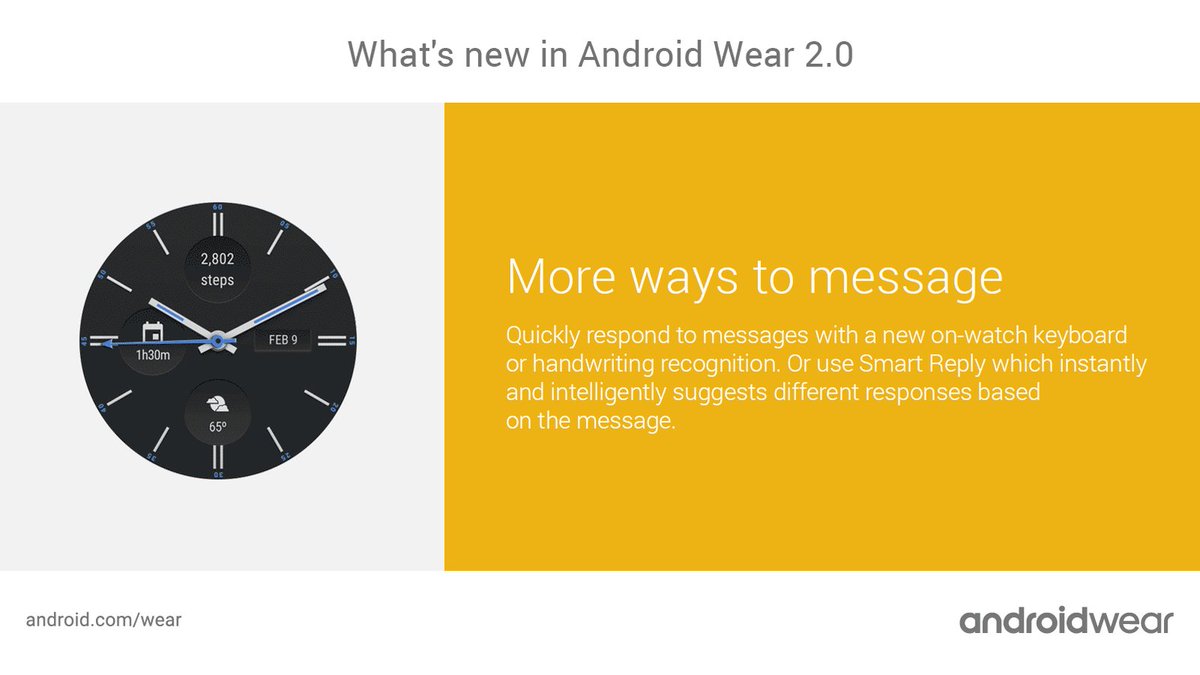
Google has improved other things like the Google Fit app for Google Android Wear where it now supports more type of workouts and exercises. One interesting thing to note is that Android Wear 2.0 comes with a keyboard to type your responses on. One would obviously not use that keyboard to write long articles or something huge in size. The major thing that makes the keyboard on Android Wear 2.0 significant is that you no longer need to swipe across a Qwerty layout screen to type a message. Instead, the keyboard is powered using the powerful prediction engine of Google Keyboard which works surprisingly well. You can also handwrite messages or use smart reply for Google Assistant.
Last but not the least, Google has added Google Assistant to Android Wear 2.0 making it a significant improvement over Android Wear 1.0 and Google Now. This is almost like Google Assistant on Google Home or Google Pixel smartphone. One thing to note is that Google has changed its philosophy after realising that one does need some physical input to operate Android Wear, making the presence of buttons and dials mandatory on the new models of watches; a far cry from what it was earlier.

Wednesday, October 19, 2016

Xiaomi announces the Wyatt Meter mechanical keyboard in China

Xiaomi announces the Wyatt Meter mechanical keyboard in China

Image Credit: home.mi
By 
Xiaomi has announced its latest product, and it is not a smartphone. Instead, the latest product is an all aluminium mechanical keyboard called the Wyatt Meter mechanical keyboad. The company previously teased the launch of the mechanical keyboard last week as reported by GizmoChina.
The keyboard is most likely made by Xiaomi subsidiary as there is no visible Xiaomi branding on it. Just like there was no branding on the Mi Notebook Air.
Image Credit: home.mi
The best part about this keyboard as with all Xiaomi products is the affordability as it does not take a toll on your bank account. The mechanical keyboard is priced at CNY 299, which can be translated to Rs 3,000 at the time of writing. That is a very reasonable for a mechanical keyboard. The keyboard will have six layers of design with 87 keys along with TTC Red Switches which can withstand up to

Saturday, October 1, 2016

Google delays Android Wear 2.0 until 2017


By Tim Schiesser on September 30, 2016, 9:30 AM


Google was originally expected to release the next major version of Android Wear late this year, however a recent post from the company has revealed the smartwatch operating system has been delayed until early 2017.

The Android Wear 2.0 developer preview program will continue throughout the rest of this year and in to 2017, with watches set to get the final build early next year. Google announced the availability of the third developer preview several days ago, and the company says another developer preview will be released before the update is sent to OEMs.

In the third developer preview, Google has added the Play Store to Android Wear 2.0. It may seem a little cramped, however users can now browse and install apps directly from their watch, rather than using the equivalent app on their smartwatch. Searching for apps is as easy as using voice commands, the tiny Android Wear keyboard, or handwriting.


The Play Store on Android Wear also allows you to install only the watch app, provided the app supports this feature of Android Wear 2.0. This prevents apps you only use on your watch from clogging up the app tray on your smartphone.

The choice to delay Android Wear 2.0 until next year seems to fit with the plans of major Android Wear OEMs such as LG, Motorola and Huawei, who decided to hold off releasing any new smartwatches during the fall. In early 2017 we could see a major relaunch of Android Wear complete with new devices running the updated operating system.

Friday, September 30, 2016

How to Disable Specific Keys on Your Keyboard in Windows 10


Dave LeClair September 30, 2016 0 minutes


The answer is clear: just disable that key!

1-Download and launch the free tool called Simple Disable Key.
2-Select the field labeled Key.
3-Hit the key want to disable on your keyboard.
4-Click Add Key.
5-Choose whether you want the key disabled in specific programs, during certain times, or always.
Click OK.

If you decide you want to quickly enable all the keys you currently have disabled, click Tools, then Enable All Keys. Also, make sure to click Options, and enable Run on Windows startup so that you’ll have always have your disabled keys in place.
Related Posts Plugin for WordPress, Blogger...