Showing posts with label Wi-Fi. Show all posts

Wednesday, April 12, 2017

GoPro Hero5 Session review: A good action camera for the price but needs improvement

GoPro Hero5 Session review: A good action camera for the price but needs improvement

GoPro Hero5 Session is the latest ‘action’ camera launched by GoPro in the Indian market earlier this year. Session 5 is the mid-tier action camera with the premium GoPro Hero5 Black on the top as the premium offering by the company. The GoPro Hero5 Session is priced at Rs 29,500.
GoPro Hero5 Session
Action cameras are used to shoot sports, bike journeys, among other things that are dangerous for devices like DSLRs or smartphone cameras to shoot. The danger here refers to the equipment getting damaged while biking, swimming or engaging in other types of adventurous sports. This is the first time I have extensively used an action camera as my early encounters were limited to shooting with DSLRs and smartphone cameras.
GoPro Hero5 Session is supposed to be aimed at consumers who want the performance and feature set of GoPro action cameras, but at an affordable price point. So let’s jump in to see how Hero5 Session fares in the review.
Build and Design: 7.5/10
The build quality of Hero5 Session is sturdy and top notch for an action cam. The rubberised top along with solid plastic exterior on the sides works perfectly in securing the internals of the camera.
GoPro Hero5 Session
One thing to note is that you don’t get anything remarkable in terms of design except the form factor. Hero5 Session is shaped like a small cube along with a microSD card slot and USB Type-C slot to charge in through a push door on the left side from the back.
GoPro Hero5 Session
The GoPro Hero5 Session does not come with a microSD card out of the box and you need to use a high-speed card, Class 10 or more for smooth 4K recording.
GoPro Hero5 Session
The action camera is waterproof, up to 10 meters in water, without any need for a special case which is impressive in itself. However, it does not come with any accessories out of the box except for a case and two adhesive mounts. I was expecting more in terms of mounts out of the box.
Features: 7.5/10
The main highlight of the GoPro Hero5 Session is its 4K recording capabilities in such a compact form factor. The 4K recording is at a standard 30 frames per second. The camera comes with an extremely wide angle lens with 10 MP image resolution for photos with effective dimensions of 3648 x 2736 pixels. The shutter button is located on the top along with the menu switching mode at the back of the camera.
GoPro Hero5 Session
You need to use both the buttons to change the modes and cycle through the options given which becomes easier to operate after initial confusion. The camera gives you the option to shoot 4K at frame rates of 30 and 25 frames per second in Wide; 2.7K at frame rates 48, 30, 25, and 24 in SuperView, Wide, Medium and Linear along with the option to shoot 2.7K in 4:3 aspect ratio from the default 16:9.
GoPro Hero5 Session
Other modes include: 2K at 60, 50, 48, 30, 25, and 24 frames per second in Wide mode; 1080p in 90, 60, 50, 48, 30, 25, and 24 frames per second and 960p in 100, 60, 50, 30, and 25 frames per second in Wide mode.
The Camera gives up options to choose modes from Wide, Medium and SuperView while shooting 720p video at 100, 60, 50, 30, and 25 frames per second. You can not go below 720p while shooting with the camera which is weird at best because going down would have given us the option to shoot at higher frame rates for potential use in slow motion videos.
GoPro Hero5 Session
The camera comes with built-in Wi-Fi and Bluetooth for you to connect it to the GoPro ‘Capture’ app for Android as well as an iOS device. You can use the app to record, review or transfer the images and videos that you shot using the camera from the Wi-Fi connection. You can also control all the settings of the action cam and get a live video of what the GoPro can see at any given point.
The camera does support video stabilisation, but that is only limited if you shoot videos up to 2.7K and it is not available if you are shooting 4K. You can use the voice control to tell GoPro to shoot or start recording by saying “GoPro start recording”.
Publish date: April 12, 2017 10:05 am| Modified date: April 12, 2017 10:10 am
Pages: 1 2 3

Friday, March 10, 2017

Average internet connection speeds up by 26 percent globally

Average internet connection speeds up by 26 percent globally

Global average internet connection speed has increased 12 percent to 7.0Mbps in the fourth quarter of 2016 — a 26 percent increase year-over-year, a new report said on Thursday.
According to the “2016 State of the Internet Report” by global leader in content delivery network (CDN) services Akamai Technologies, South Korea again had the highest average connection speed globally at 26.1Mbps in the fourth quarter.
On the average internet speed in India, the report says that the country made rapid strides on this front. The fourth quarter of 2016 saw internet speeds rising to 5.6Mbps, up from 4.1Mbps last quarter. However despite the major jump India continues to remain at the bottom.
Globally, the internet connection speeds continued to show positive long-term trends around the world, with particularly strong year-over-year increases across all broadband adoption metrics as per the report.
“When Akamai first published the report in 2008, we defined ‘high broadband’ as 5Mbps and above, which nine years ago had an adoption rate of 16% globally. We’re now seeing a 15Mbps adoption rate of 25 percent worldwide,” said David Belson, editor of the report.
The report provided insight into key global statistics such as connection speeds, broadband adoption metrics and notable internet disruptions, among others.
At 26.7 Mbps, the district of Columbia led the United States in average connection speed.
Global 4, 10, 15 and 25Mbps broadband adoption rates increased 15 percent, 31 percent, 37 percent and 45 percent year over year, respectively.
IANS

Thursday, February 9, 2017

The world’s first Google Station Wi-Fi hotspot will be set up in Pune

The world’s first Google Station Wi-Fi hotspot will be set up in Pune

Image: Google
By 
It’s official, India will be the first country in the world where Google will deploy Google Station. It’s a fast Wi-Fi initiative that aims to bring high-speed internet access to public areas.
While India is the lucky country to get the station, the lucky city where the service will first be deployed in Pune. Google Station is a collaborative project between IBM, Larsen and Toubro and RailTel.
It’s a Rs 150 crore project that’s won by these companies as part of Pune’s Smart City initiative, reports The Economic Times.
Unlike Google’s earlier Railwire project with RailTel, the purpose of Google Station is to provide fast access to the internet in public areas and then eventually monetise the whole system. The smart city council will take a share of this revenue.
As with Railwire, Google will primarily provide the platform support required to integrate Wi-Fi access across a multitude of locations with a single sign-on process. Users will simply need to authenticate via OTP.
L&T is reportedly the ‘master system integrator’ for the project and will provide much of the infrastructure required.
Public call boxes, PA systems, environmental sensors and more will be integrated into the system.
ET reports that Google is working with the Pune government for the deployment of variable messaging displays as well.
IBM’s solutions will provide the “backbone” for Pune’s Smart City Network, the report adds.

Monday, December 12, 2016

In-flight Wi-Fi in India to be delayed indefinitely by “spurious” security concerns and red tape

In-flight Wi-Fi in India to be delayed indefinitely by “spurious” security concerns and red tape

By 
Wi-Fi over the skies of India will remain a pipe-dream for now. In August, Civil Aviation Secretary Rajeev Chaubey had stated that we can expect to see in-flight Wi-Fi “in the next 10 days.” It’s now December.
A report on The Wall Street Journal reveals that the plans for in-flight Wi-Fi in India will remain banned, pending approval from the “communications ministry.” The Home Ministry has reportedly been opposed to the plan, citing security concerns.
As it stands today, any commercial passenger aircraft is required to disable in-flight Wi-Fi access when flying over Indian airspace. This includes international flights.
As Mashable points out, airlines such as Jet Airways already have approval from the Federal Aviation Authority and other regulatory bodies. Even our neighbours, Pakistan and China included, already allow in-flight Wi-Fi.
International flight safety norms are quite stringent and it’s hard to see what’s worrying the Home Ministry so. Mashable also adds that aviation technology specialists have dismissed these security concerns as “spurious”.
In fact, one can easily make the case that free Wi-Fi at railway stations is a far greater cause for concern than in-flight Wi-Fi in a closed, isolated environment 36,000 feet above the ground.
With this push for Digital India, demonetisation pushing the country to digital transactions and myriad such future-looking plans, it’s hard to believe that the fastest, most modern system of transportation is still held back in such a way.

Wednesday, October 5, 2016

The first Project Tango AR smartphone arrives next month


By Jose Vilches on October 5, 2016, 1:45 PM


Google may putting all its weight behind the new Pixel smartphones as it moves to become a full-fledged, vertically integrated device maker — controlling hardware, software, and ecosystem design. But that doesn't mean it has forgotten about its other, niche smartphone projects. According to Cnet, the company’s first commercially-available Tango phone will go on sale next month, as confirmed by Google’s head of VR and AR Clay Bavor.

The Lenovo-made Phab 2 Pro uses depth sensing 3D camera system that scans the world around you to deliver augmented reality experiences. It can do things like scan real world objects and bring them into a virtual world, and it can position itself in a room via motion tracking while using the included fisheye camera to identify edges and corners, which can be used to build a three-dimensional map of indoor spaces.


Spec-wise, the handset features a huge 6.4-inch Quad HD (2,560 x 1,440) IPS curved glass display, a Qualcomm quad-core Snapdragon 652 SoC alongside 4GB of RAM, a 4,050mAh battery and 64GB of local flash storage expandable via microSD card slot.

Around back you’ll find a 16-megapixel camera and a fish-eye camera as well as depth and motion tracking sensors that are necessary to make Tango’s magic work, alongside a series of sensors under the hood. Other features include dual SIM slots, a fingerprint reader, a front-facing eight megapixel camera, dual-band Wi-Fi, Bluetooth 4.0, triple-array active noise cancellation and Dolby Atmos audio technology.

The Phab 2 Pro was supposed to arrive in September but got delayed for unspecified reasons. It should sell for $499 unlocked in your choice of gray or gold aluminum finish. As Cnet points out, only the Google Pixel phones will be compatible with the Daydream VR headset, not the Phab2 Pro. The latter is all about augmented reality.

Monday, October 3, 2016

How to Fix “Check Your Connection and Try Again” in Google Play Store


Joel Lee October 3, 2016 1 minute

As an Android user, you’ve probably run into your fair share of app issues and operating system glitches. (Not that iOS is any better — those users have their own kinks to work out.) And one of the more problem-prone areas is the Google Play Store.20 Common Android Problems Solved 20 Common Android Problems SolvedHaving problems with your Android device? We can solve it!READ MORE

When you have problems with the Play Store app, there are a handful of simple fixes that will work most of the time and you should always start there — but sometimes, as is the case here, you’ll need to try something a little more outside the box.

If you keep seeing “Check your connection and try again” and nothing works to fix it, try the following methods. These steps are for Android 5.1 but should be similar regardless of your Android version.

Method 1: Change time settings.
Open Settings and select Date & time.
Disable Automatic date & time.
Disable Automatic time zone.
Select Set date and go forward by five years.
Open the Play Store app and let it connect.
Go back and enable both Automatic date & time and Automatic time zone settings.

Method 2: Remove the host file.
You must have a rooted Android device.
You must have a file manager app that can view system files. I use File Manager by ZenUI.
With your file manager app, navigate to /root/etc/ and look for the hosts file (it doesn’t have an extension).
Remove it or rename it (e.g. hosts-backup).
Reboot your device.
Open the Play Store app and let it connect.

Method 3: Change DNS server.
You must be using a Wi-Fi connection.
Open Settings and select Wi-Fi.
Tap-and-hold the network you’re connected to and select Modify network.
Enable Advanced options.
Change IP settings to Static.
Change DNS 1 to 8.8.8.8.
Change DNS 2 to 8.8.4.4.
Tap Save.
Open Settings and select Apps.
Under All, clear the cache for these apps: Google Play Store, Google Play Services, and Google Services Framework.
Open the Play Store app and let it connect.

Which one worked for you? If none of them did but you found a different solution elsewhere, please let us know in a comment down below! Thanks.

Friday, September 30, 2016

Arduino unleashes a serious Internet of Things system for hardware hackers


Posted 15 hours ago by John Biggs (@johnbiggs)


Back in the old days hardware manufacturers felt safe in the knowledge that no mere hardware hacker could attempt to recreate their inventions. From Sony to Philips to LG to Samsung, the consumer electronics industry was locked up and no one could crack the case. Until those meddling Arduino kids came along…

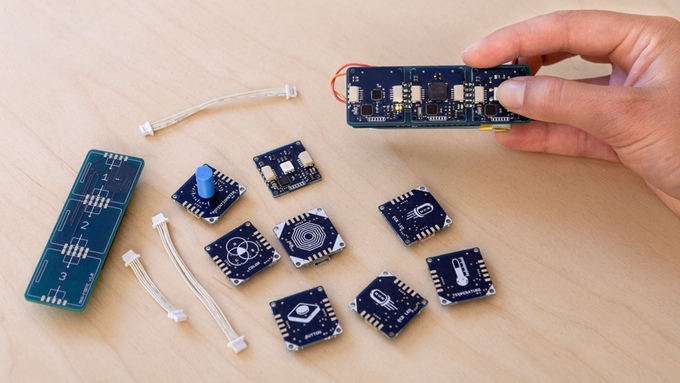
Now anyone can make cool hardware and, thanks to Arduino, it is easier than ever to connect your devices to the Internet and take in data from the outside world. TheESLOV IoT Invention Kit is an official Arduino product that adds Internet of Things capabilities to your hardware products. Trying to build a connected fridge to beat Samsung? Go for it with the ESLOV. Want to knock Sony off its perch? Try popping an ESLOV unit onto your Arduino board and take on major manufacturers from your living room.

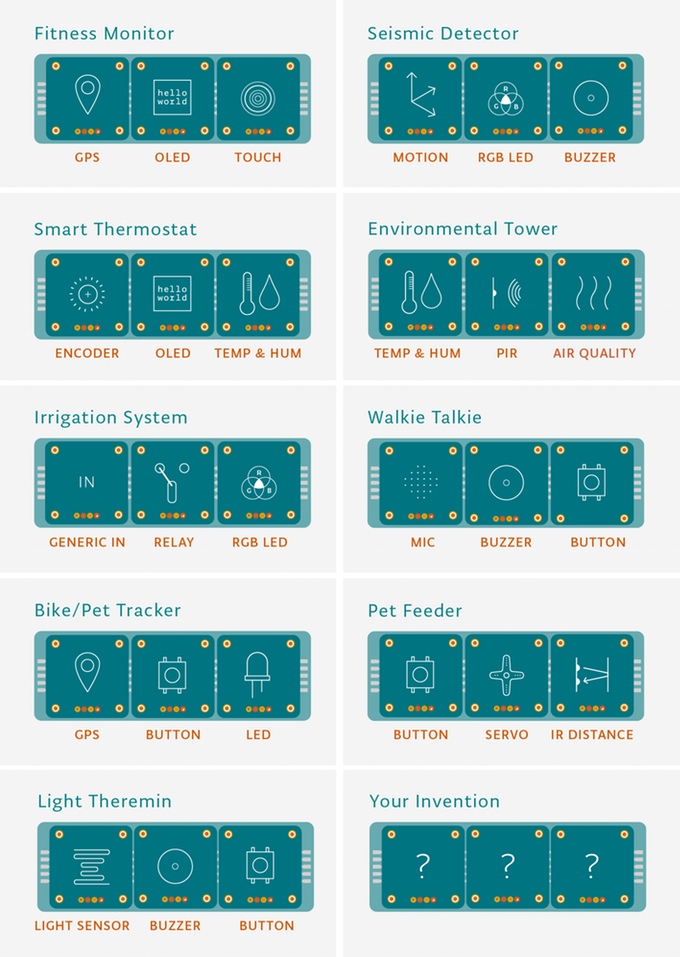
Think of the ESLOV system as a sort of Mindstorms on steroids. This self-described “plug-and-play toolkit” lets you connect multiple sensors and outputs together to create various systems. This chart shows a few of the possible permutations. Everything is controlled via Arduino’s online IDE.


ESLOV IoT Invention Kit project video thumbnail


The system consists of various sensors as well as a Wi-Fi hub. Interestingly each sensor runs a ATmega328P processor, the same one found on the Arduino Uno. The entry-level $99 kit includes a WiFi and motion hub, a button, a buzzer, and an LED. The Pro model includes a Hall sensor, OLED Display, and GPS – 22 modules in total – for $499. The $249 intermediate kit seems to contain everything you need to get started, however.

The company is raising on Kickstarter and they’re looking for a hefty $500,000. They’ve hit $15K so far but with a little love from the maker community I think they can get it done. The kit should ship next July.


alert icon applepay icon arrow-down icon arrow-left icon arrow-right icon bar-chart icon bell icon book icon brand-assets icon cart icon chat icon check icon circle-k icon circle-left icon circle-right icon clipboard icon clock icon close icon closed-caption icon duplicate icon embed icon facebook icon flag icon gear icon heart icon info icon instagram icon kickstarter icon leaf icon loading-spin icon lock icon mail icon menu icon mobile icon pause icon pin icon pinterest icon play icon plus icon search icon solid-arrow icon star icon stopwatch icon trash icon tumblr icon twitter icon user icon volume-up icon write icon youtube icon
Related Posts Plugin for WordPress, Blogger...