Tuesday, March 21, 2017

Apple iPad Pro 2 series to release soon, say reports: Here’s all we know so far

Apple iPad Pro 2 series to release soon, say reports: Here’s all we know so far
By 
Apple generally has an event at the start of spring – somewhere in March to April time frame. MacRumors suggests that an Apple event is on its way, which is going to happen sometime this week. This makes sense too, as last year the iPad Pro 9.7-inch was introduced on 21 March. According to the publication, the rumoured launch comes from reputable supply chain analysts and a possibility of an early April event is also on the cards.
According to a report in Inquisitr, the Apple iPad Pro 2 is set to launch soon, in not one, but four different variants. Online speculations hint at display sizes such as 9.7-inch, 10.5-inch and 12.9-inch for the iPad Pro 2. International media hasn’t received any invite to any Apple event yet, so an exact date is not known. So this may mean that the event is scheduled in April, as there is at least a 10-day gap between the invite-sent date and an Apple event. Inquisitr even hints that the iPad Pro 2 launch could happen via just a press release and not an actual event.
9To5Mac hints that the 9.7-inch iPad Pro 2 model will come with an improved skin with True Tone technology. This technology basically gives the iPad the smarts to automatically adjust its colour temperature based on the surroundings. This variant of the 9.7-inch iPad Pro is expected to sport the same Apple A9X chipset as the iPad Air 2.
The Apple iPad Pro 2 with the 10.5-inch display will be something new, as it is a display size that Apple hasn’t sold before. According to 9To5Mac, the 10.5-inch model will have extremely thin bezels, which means that it will have the same footprint as that of the 9.7-inch model, but with a much larger display real estate. It is also expected to come with a virtual Home button. It will also come with an LCD panel and not an OLED panel as was previously rumoured. The 10.5-inch iPad Pro is expected to be housing an Apple A10X chipset, which is an improved variant of the A10 chipset seen in the iPhone 7.
The regular upgrade to the iPad Pro in the 9.7-inch and 12.9-inch display sizes are expected to sport the same Apple A10X chipset as the 10.5-inch variant. As usual both these models will support the Apple Pencil Stylus as well. The 12.9-inch iPad Pro 2 is most likely going to get the 12MP rear camera as well as True Tone technology which is present in the current 9.7-inch iPad Pro model.
All these are speculations, so we will have to wait till Apple announces actual event dates.

Intel Optane SSD DC P4800X Series unveiled for data centers

Intel Optane SSD DC P4800X Series unveiled for data centers

By 
Intel has unveiled a fast and responsive solid state drive for data centers. The Intel Optane SSD DC P4800X Series is designed to boost scale per server and accelerate applications.
The solid state drive provides industry leading capabilities such as high throughput, low latency, high endurance and a high quality of service. The Optane series of Solid State Drives by Intel offers good performance at low queue depth.
The drives remain responsive even under heavy load, and consistently delivers highly predictable and fast service. The drives will allow data center operators to increase the capacity of the same data centers. The Intel Optane SSD DC P4800X expands the reach of cloud computing solutions, and is designed to be used for emerging applications such as artificial intelligence, electronic trading, machine learning and medical scans.
The Intel Optane SSD DC P4800X with Intel Memory Drive Technology increases the size of memory pools, or allows a portion of the DRAM to be displaced. The drive is designed to seamlessly integrate into the memory subsystems and presents itself as DRAM to the operating system.
The drives are available immediately to Intel customers in the early ship program. More variants, in terms of capacity and form factors are expected to be available from the second half of 2017.

Friday, March 10, 2017

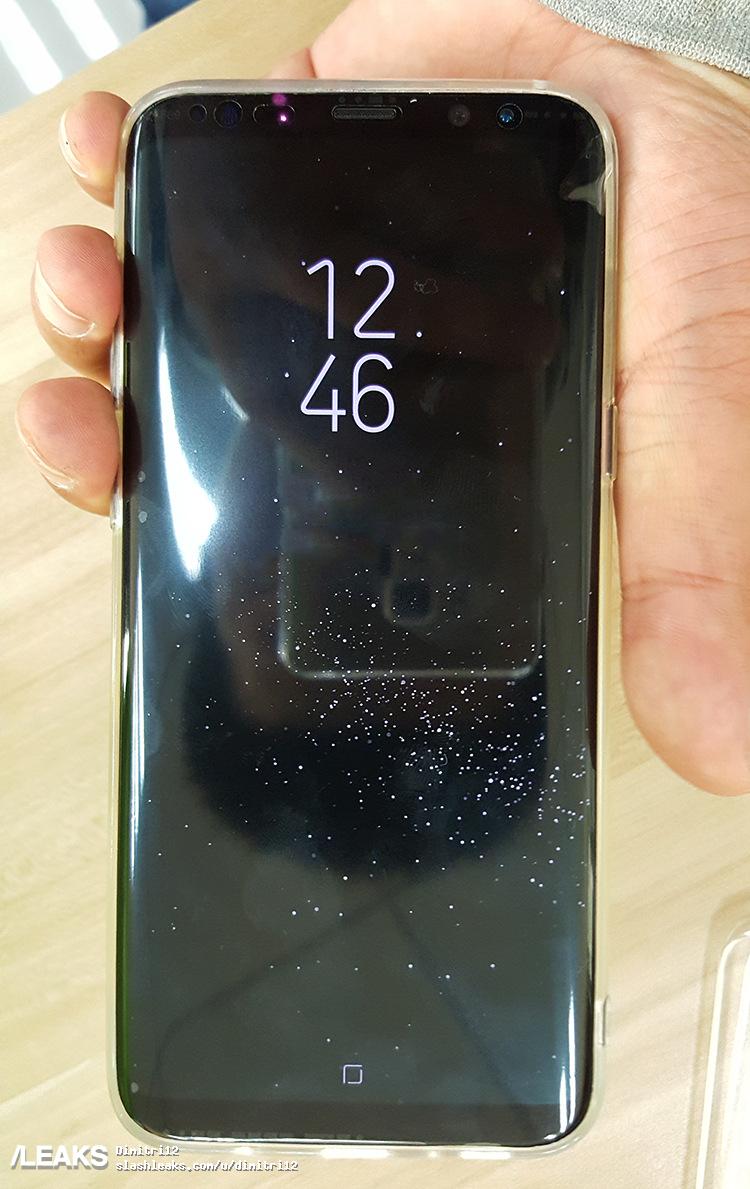
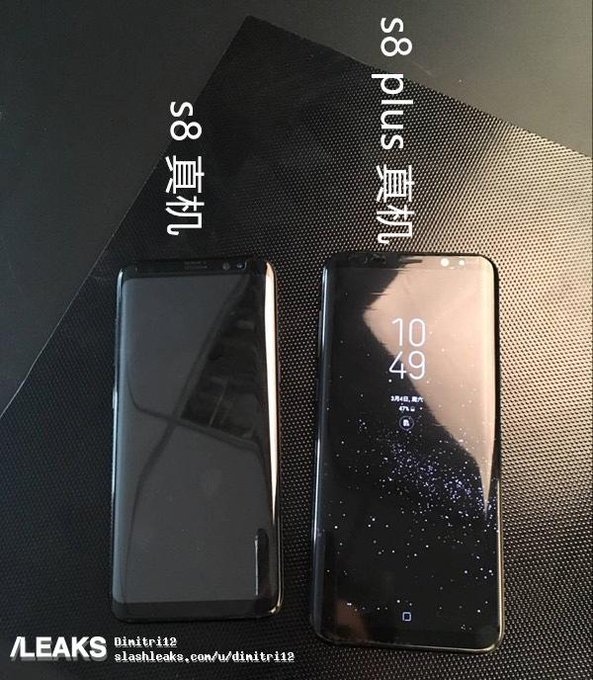
Samsung Galaxy S8, Galaxy S8+ gets FCC certfication, will feature facial recognition; also live images leaked

Samsung Galaxy S8, Galaxy S8+ gets FCC certfication, will feature facial recognition; also live images leaked

By 
It’s a new day and we have more scoop on the Galaxy S8. This one comes from Korea Economic Daily that says the upcoming flagship smartphone from Samsung will feature facial recognition. This will be an extra security option in addition to the fingerprint sensor, and possibly an iris recognition which made its appearance on the Note 7. This could make unlocking the smartphone easier as one would just have to look into the device.
Apparently it will be faster too as it could take less than 0.01 seconds to unlock your phone as said by a Samsung official. So more security and faster unlocking, that’s a big thumbs up.
The smartphone has also said to have got official FCC certification which has revealed that the Samsung Galaxy S8 will be manufactured in Vietnam and will have models SM-G950U, SM-G950U1 and SM-G950W. Same is the case with the S8 Plus which has three model numbers, SM-G955U, SM-G955U1 and SM-G955W
s8-fcc-labels (1) s8-fcc-labels (2)
Apart from that we are seeing more alleged images of the smartphone doing rounds on the internet and they do match the one Evan Blass released a week back.
Image: BGR
Image: BGR
And then we have these hands-on videos that yet again show the curvy handset.
The Galaxy S8 will be officially unveiled at the Unpacked event on 29 March and is expected to hit shelves on 28 April.

Facebook Messenger is the latest app from the social network giant to ape Snapchat features

Facebook Messenger is the latest app from the social network giant to ape Snapchat features

By 
If you thought Facebook was done copying Snapchat features, think again. Today the company announced ‘Messenger Day’, which brings basic Snapchat story functionality to the Facebook Messenger. The company has copied a number features and brought them to Instagram and WhatsApp, and now the Messenger app from the social network gets the feature where a user can post photos and videos that disappear after 24 hours.
The announcement of the new feature comes just a day after Facebook added geostickers to Instagram where users can add stickers and illustrations into a story which is relevant to that particular location.
Here is how you can use the new Stories feature on Facebook Messenger:
You need to first make sure your Messenger app is updated to the latest version
facebook-messenger-day
Open Messenger, and tap on the camera ring at the bottom. This opens up a full-screen camera where you can take a picture. This can also be done by tapping the “Add to your day” button at the top of your inbox.
Take a quick photo or video
facebook-messenger-day2
You can add effects and graphics by tapping the smiley face icon. You can also add text over your images by tapping the “Aa” icon, or even scribble by tapping the squiggly line in the top right corner.
facebook-messenger-day-3
Once you are done with editing, you just need to tap the arrow in the bottom right corner. This can be added directly to your day, saved to your phone or can be sent to a specific person or group of people.
With the feature launch, Facebook now has three apps that try to ape Snapchat, making it clear that it wants to bring it down by any way possible. This also brings in a lot of confusion to smartphone users who like posting ‘Stories’ everyday as now they now have multiple platforms to post.

Here are four Google apps that are more useful than you’d think

Here are four Google apps that are more useful than you’d think

Getty Images
By 
Most of us just stick to the bare essential apps that usually come pre-installed on our devices. Various surveys in the past have even suggested that the majority of smartphone users install no more than one additional app per month on their devices.
There are, however, several Google apps that don’t come preinstalled on your devices that you really should install. They offer a number of features that can be extremely useful in ways that you didn’t think possible.
So here goes…
Android Device Manager
Android Device Manager 720
The Android Device Manager is the app you wished you’d installed when you lost your phone. This simple little app lets you track your Android device, reset the lock-screen password that you forgot and also remotely erase the data from your phone.
Some security software asks you to pay for services like this, but why should you when it’s already available for free? The app isn’t perfect, and needs a working data or Wi-Fi connection to function, but it’s still better than leaving your phone unsecured.
Wallpapers
Wallpapers app 720
You know how hard it is to find decent wallpapers for your smartphone. There are a number of third-party apps that will find wallpapers for you and there’s always Google, but did you know that there also is a first-party app that will take care of all your wallpaper needs?
Simply titled ‘Wallpapers’, this app accesses images from Google+, Google Earth and others and sets your wallpaper for you, including individual ones for your lock screen and home screen. You can set the app to change your wallpapers periodically as well.
While the app is well rated, there are some complaints that the library is a little thin at the moment.
Google Authenticator
With all these stories of leaks and hacked accounts flying around, securing your own Google accounts should be high up on your priority list. For this, Google offers two options. You can either enable two-step verification via SMS or you can use the Google Authenticator app.
SMS is good, but you’ll need to update your number every time you change a SIM, even when you’re travelling, which can be a pain. Google Authenticator fixes this minor inconvenience.
Once paired with your account, you can get Google to ask you for your authentication code every time you log in somewhere. The Authenticator will generate a random key whenever you want to log in to your account.
Google Arts and Culture
This isn’t a must-have app per se, but it’s a very educational one and can be very useful if you have a bunch of young ‘uns on your hands. The app is interactive and educational and even supports VR tours of collections and museums. What more do you need to keep the tiny tots busy?

Google addresses Pixel and Pixel XL microphone issue, suggests user to replace their units

Google addresses Pixel and Pixel XL microphone issue, suggests user to replace their units

By 
Google’s in-house smartphones, the Pixel and the Pixel XL have been well received. The handsets not only provide the best Android experience but also come with one of the best smartphone cameras.
However, the smartphones have not been perfect. Back in January we heard about an issue where certain Pixel and Pixel XL owners had complained about bad speaker performance with crackling noise. The issue was thankfully resolved as it was a software issue, rather than a hardware issue, which was fixed via a software update.
Now a new issue has turned up which could be a more serious issue. Certain Google Pixel owners have shown concern on Reddit and Google’s support forums saying that their units are having trouble with the microphone. The unresponsive microphone is a rather serious issue as users are unable to make phone calls.
Following the numerous complaints, Brian Rakowski from Google joined the discussion and confirmed that there is an issue and is probably hardware related. It was likely caused by a crack in the solder connection on the audio codec.
Rakowski further said “It’s possible that some replacement phones were not properly qualified before we understood this issue, but that’s no longer the case, additional steps to reinforce the connection at time of manufacture on phones built since January.”
So basically a software update is not an option anymore. Google will replace the faulty units and is taking steps to make sure that replacement units don’t have any similar issues.

Average internet connection speeds up by 26 percent globally

Average internet connection speeds up by 26 percent globally

Global average internet connection speed has increased 12 percent to 7.0Mbps in the fourth quarter of 2016 — a 26 percent increase year-over-year, a new report said on Thursday.
According to the “2016 State of the Internet Report” by global leader in content delivery network (CDN) services Akamai Technologies, South Korea again had the highest average connection speed globally at 26.1Mbps in the fourth quarter.
On the average internet speed in India, the report says that the country made rapid strides on this front. The fourth quarter of 2016 saw internet speeds rising to 5.6Mbps, up from 4.1Mbps last quarter. However despite the major jump India continues to remain at the bottom.
Globally, the internet connection speeds continued to show positive long-term trends around the world, with particularly strong year-over-year increases across all broadband adoption metrics as per the report.
“When Akamai first published the report in 2008, we defined ‘high broadband’ as 5Mbps and above, which nine years ago had an adoption rate of 16% globally. We’re now seeing a 15Mbps adoption rate of 25 percent worldwide,” said David Belson, editor of the report.
The report provided insight into key global statistics such as connection speeds, broadband adoption metrics and notable internet disruptions, among others.
At 26.7 Mbps, the district of Columbia led the United States in average connection speed.
Global 4, 10, 15 and 25Mbps broadband adoption rates increased 15 percent, 31 percent, 37 percent and 45 percent year over year, respectively.
IANS

Related Posts Plugin for WordPress, Blogger...